
Table of Contents
1. Overview
In this tutorial, we’ll explore using H2 with Spring Boot. Just like other databases, there’s full intrinsic support for it in the Spring Boot ecosystem.
2. Dependencies
Let’s begin with the h2 and spring-boot-starter-data-jpa dependencies:
<dependency>
    <groupId>org.springframework.boot</groupId>
    <artifactId>spring-boot-starter-data-jpa</artifactId>
</dependency>
<dependency>
    <groupId>com.h2database</groupId>
    <artifactId>h2</artifactId>
    <scope>runtime</scope>
</dependency>
3. Database Configuration
By default, Spring Boot configures the application to connect to an in-memory store with the username sa and an empty password.
However, we can change those parameters by adding the following properties to the application.properties file:
spring.datasource.url=jdbc:h2:mem:testdb
spring.datasource.driverClassName=org.h2.Driver
spring.datasource.username=sa
spring.datasource.password=password
spring.jpa.database-platform=org.hibernate.dialect.H2Dialect
By design, the in-memory database is volatile, and data will be lost when we restart the application.
We can change that behavior by using file-based storage. To do this we need to update the spring.datasource.url:
spring.datasource.url=jdbc:h2:file:/data/demo
The database can also operate in other modes.
4. Database Operations
Carrying out CRUD operations with H2 within Spring Boot is the same as with other SQL databases, and our tutorials in the Spring Persistence series do a good job of covering this.
In the meantime, let’s add a data.sql file in src/main/resources:
DROP TABLE IF EXISTS billionaires;

CREATE TABLE billionaires (
  id INT AUTO_INCREMENT  PRIMARY KEY,
  first_name VARCHAR(250) NOT NULL,
  last_name VARCHAR(250) NOT NULL,
  career VARCHAR(250) DEFAULT NULL
);

INSERT INTO billionaires (first_name, last_name, career) VALUES
  ('Aliko', 'Dangote', 'Billionaire Industrialist'),
  ('Bill', 'Gates', 'Billionaire Tech Entrepreneur'),
  ('Folrunsho', 'Alakija', 'Billionaire Oil Magnate');
Spring Boot will automatically pick up the data.sql and run it against our configured H2 database during application startup. This is a good way to seed the database for testing or other purposes.
5. Accessing the H2 Console
H2 database has an embedded GUI console for browsing the contents of a database and running SQL queries. By default, the H2 console is not enabled in Spring.
To enable it, we need to add the following property to application.properties:
spring.h2.console.enabled=true
Then, after starting the application, we can navigate to http://localhost:8080/h2-console, which will present us with a login page.
On the login page, we’ll supply the same credentials that we used in the application.properties:
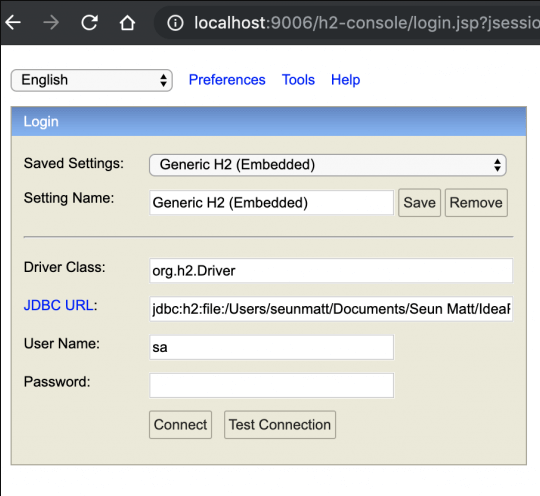
Once we connect, we’ll see a comprehensive webpage that lists all the tables on the left side of the page and a textbox for running SQL queries:
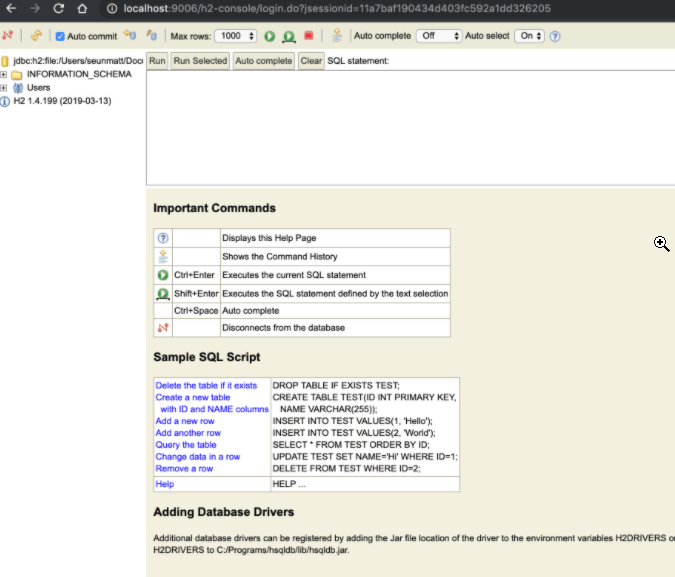
The web console has an auto-complete feature that suggests SQL keywords. The fact that the console is lightweight makes it handy for visually inspecting the database or executing raw SQL directly.
Moreover, we can further configure the console by specifying the following properties in the project’s application.properties with our desired values:
spring.h2.console.path=/h2-console
spring.h2.console.settings.trace=false
spring.h2.console.settings.web-allow-others=false
In the snippet above, we set the console path to be /h2-console, which is relative to the address and port of our running application. Therefore, if our app is running at http://localhost:9001, the console will be available at http://localhost:9001/h2-console.
Furthermore, we set spring.h2.console.settings.trace to false to prevent trace output, and we can also disable remote access by setting spring.h2.console.settings.web-allow-others to false.
6. Conclusion
The H2 database is fully compatible with Spring Boot. We’ve seen how to configure it and how to use the H2 console for managing our running database.
The complete source code is available over on GitHub.
