In this chapter, you are going to learn in detail about How to register the Spring Boot Micro service application into the Eureka Server. Before registering the application, please make sure Eureka Server is running on the port 8761 or first build the Eureka Server and run it. For further information on building the Eureka server, you can refer to the previous chapter.
First, you need to add the following dependencies in our build configuration file to register the microservice with the Eureka server.
Maven users can add the following dependencies into the pom.xml file −
<dependency>
   <groupId>org.springframework.cloud</groupId>
   <artifactId>spring-cloud-starter-eureka</artifactId>
</dependency>
Gradle users can add the following dependencies into the build.gradle file −
compile('org.springframework.cloud:spring-cloud-starter-eureka')
Now, we need to add the @EnableEurekaClient annotation in the main Spring Boot application class file. The @EnableEurekaClient annotation makes your Spring Boot application act as a Eureka client.
The main Spring Boot application is as given below −
package com.maixuanviet.eurekaclient;

import org.springframework.boot.SpringApplication;
import org.springframework.boot.autoconfigure.SpringBootApplication;
import org.springframework.cloud.netflix.eureka.EnableEurekaClient;

@SpringBootApplication
@EnableEurekaClient
public class EurekaclientApplication {
   public static void main(String[] args) {
      SpringApplication.run(EurekaclientApplication.class, args);
   }
}
To register the Spring Boot application into Eureka Server we need to add the following configuration in our application.properties file or application.yml file and specify the Eureka Server URL in our configuration.
The code for application.yml file is given below −
eureka:
   client:
      serviceUrl:
         defaultZone: http://localhost:8761/eureka
      instance:
      preferIpAddress: true
spring:
   application:
      name: eurekaclient
The code for application.properties file is given below −
eureka.client.serviceUrl.defaultZone  = http://localhost:8761/eureka
eureka.client.instance.preferIpAddress = true
spring.application.name = eurekaclient
Now, add the Rest Endpoint to return String in the main Spring Boot application and the Spring Boot Starter web dependency in build configuration file. Observe the code given below −
package com.maixuanviet.eurekaclient;

import org.springframework.boot.SpringApplication;
import org.springframework.boot.autoconfigure.SpringBootApplication;
import org.springframework.cloud.netflix.eureka.EnableEurekaClient;
import org.springframework.web.bind.annotation.RequestMapping;
import org.springframework.web.bind.annotation.RestController;

@SpringBootApplication
@EnableEurekaClient
@RestController
public class EurekaclientApplication {
   public static void main(String[] args) {
      SpringApplication.run(EurekaclientApplication.class, args);
   }
   @RequestMapping(value = "/")
   public String home() {
      return "Eureka Client application";
   }
}
The entire configuration file is given below.
For Maven user – pom.xml
<?xml version = "1.0" encoding = "UTF-8"?>
<project xmlns = "http://maven.apache.org/POM/4.0.0"
   xmlns:xsi = "http://www.w3.org/2001/XMLSchema-instance"
   xsi:schemaLocation = "http://maven.apache.org/POM/4.0.0
   http://maven.apache.org/xsd/maven-4.0.0.xsd">

   <modelVersion>4.0.0</modelVersion>
   <groupId>com.maixuanviet</groupId>
   <artifactId>eurekaclient</artifactId>
   <version>0.0.1-SNAPSHOT</version>
   <packaging>jar</packaging>

   <name>eurekaclient</name>
   <description>Demo project for Spring Boot</description>

   <parent>
      <groupId>org.springframework.boot</groupId>
      <artifactId>spring-boot-starter-parent</artifactId>
      <version>1.5.9.RELEASE</version>
      <relativePath/> <!-- lookup parent from repository -->
   </parent>

   <properties>
      <project.build.sourceEncoding>UTF-8</project.build.sourceEncoding>
      <project.reporting.outputEncoding>UTF-8</project.reporting.outputEncoding>
      <java.version>1.8</java.version>
      <spring-cloud.version>Edgware.RELEASE</spring-cloud.version>
   </properties>

   <dependencies>
      <dependency>
         <groupId>org.springframework.cloud</groupId>
         <artifactId>spring-cloud-starter-eureka</artifactId>
      </dependency>
      <dependency>
         <groupId>org.springframework.boot</groupId>
         <artifactId>spring-boot-starter-web</artifactId>
      </dependency>
      <dependency>
         <groupId>org.springframework.boot</groupId>
         <artifactId>spring-boot-starter-test</artifactId>
         <scope>test</scope>
      </dependency>
   </dependencies>

   <dependencyManagement>
      <dependencies>
         <dependency>
            <groupId>org.springframework.cloud</groupId>
            <artifactId>spring-cloud-dependencies</artifactId>
            <version>${spring-cloud.version}</version>
            <type>pom</type>
            <scope>import</scope>
         </dependency>
      </dependencies>
   </dependencyManagement>

   <build>
      <plugins>
         <plugin>
            <groupId>org.springframework.boot</groupId>
            <artifactId>spring-boot-maven-plugin</artifactId>
         </plugin>
      </plugins>
   </build>

</projecta>
For Gradle user – build.gradle
buildscript {
   ext {
      springBootVersion = '1.5.9.RELEASE'
   }
   repositories {
      mavenCentral()
   }
   dependencies {
      classpath("org.springframework.boot:spring-boot-gradle-plugin:${springBootVersion}")
   }
}

apply plugin: 'java'
apply plugin: 'eclipse'
apply plugin: 'org.springframework.boot'

group = 'com.maixuanviet'
version = '0.0.1-SNAPSHOT'
sourceCompatibility = 1.8

repositories {
   mavenCentral()
}
ext {
   springCloudVersion = 'Edgware.RELEASE'
}
dependencies {
   compile('org.springframework.cloud:spring-cloud-starter-eureka')
   testCompile('org.springframework.boot:spring-boot-starter-test')
   compile('org.springframework.boot:spring-boot-starter-web')
}
dependencyManagement {
   imports {
      mavenBom "org.springframework.cloud:spring-cloud-dependencies:${springCloudVersion}"
   }
}
You can create an executable JAR file, and run the Spring Boot application by using the following Maven or Gradle commands −
For Maven, you can use the following command −
mvn clean install
After “BUILD SUCCESS”, you can find the JAR file under the target directory.
For Gradle, you can use the following command −
gradle clean build
After “BUILD SUCCESSFUL”, you can find the JAR file under the build/libs directory.
Now, run the JAR file by using the command as shown −
java –jar <JARFILE>
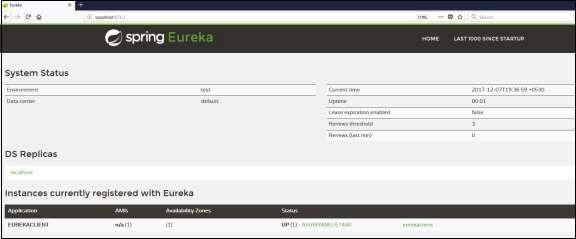
Now, the application has started on the Tomcat port 8080 and Eureka Client application is registered with the Eureka Server as shown below −

Hit the URL http://localhost:8761/ in your web browser and you can see the Eureka Client application is registered with Eureka Server.
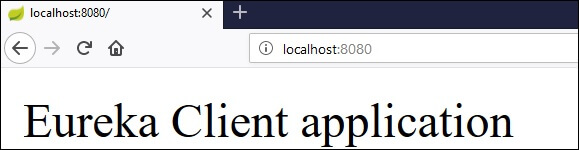
Now hit the URL http://localhost:8080/ in your web browser and see the Rest Endpoint output.