
Table of Contents
1. Introduction
In this article, we’ll implement a custom authentication scenario with Spring Security by adding an extra field to the standard login form.
We’re going to focus on 2 different approaches, to show the versatility of the framework and the flexible ways we can use it in.
Our first approach will be a simple solution which focuses on reuse of existing core Spring Security implementations.
Our second approach will be a more custom solution that may be more suitable for advanced use cases.
We’ll build on top of concepts that are discussed in our previous articles on Spring Security login.
2. Maven Setup
We’ll use Spring Boot starters to bootstrap our project and bring in all necessary dependencies.
The setup we’ll use requires a parent declaration, web starter, and security starter; we’ll also include thymeleaf :
<parent>
    <groupId>org.springframework.boot</groupId>
    <artifactId>spring-boot-starter-parent</artifactId>
    <version>2.4.0</version>
    <relativePath/>
</parent>

<dependencies>
    <dependency>
        <groupId>org.springframework.boot</groupId>
        <artifactId>spring-boot-starter-web</artifactId>
    </dependency>
    <dependency>
        <groupId>org.springframework.boot</groupId>
        <artifactId>spring-boot-starter-security</artifactId>
    </dependency>
    <dependency>
        <groupId>org.springframework.boot</groupId>
        <artifactId>spring-boot-starter-thymeleaf</artifactId>
     </dependency>
     <dependency>
        <groupId>org.thymeleaf.extras</groupId>
        <artifactId>thymeleaf-extras-springsecurity5</artifactId>
    </dependency>
</dependencies>
The most current version of Spring Boot security starter can be found over at Maven Central.
3. Simple Project Setup
In our first approach, we’ll focus on reusing implementations that are provided by Spring Security. In particular, we’ll reuse DaoAuthenticationProvider and UsernamePasswordToken as they exist “out-of-the-box”.
The key components will include:
- SimpleAuthenticationFilter – an extension of UsernamePasswordAuthenticationFilter
- SimpleUserDetailsService – an implementation of UserDetailsService
- User – an extension of the User class provided by Spring Security that declares our extra domain field
- SecurityConfig – our Spring Security configuration that inserts our SimpleAuthenticationFilter into the filter chain, declares security rules and wires up dependencies
- login.html – a login page that collects the username, password, and domain
3.1. Simple Authentication Filter
In our SimpleAuthenticationFilter, the domain and username fields are extracted from the request. We concatenate these values and use them to create an instance of UsernamePasswordAuthenticationToken.
The token is then passed along to the AuthenticationProvider for authentication:
public class SimpleAuthenticationFilter
  extends UsernamePasswordAuthenticationFilter {

    @Override
    public Authentication attemptAuthentication(
      HttpServletRequest request,
      HttpServletResponse response)
        throws AuthenticationException {

        // ...

        UsernamePasswordAuthenticationToken authRequest
          = getAuthRequest(request);
        setDetails(request, authRequest);

        return this.getAuthenticationManager()
          .authenticate(authRequest);
    }

    private UsernamePasswordAuthenticationToken getAuthRequest(
      HttpServletRequest request) {

        String username = obtainUsername(request);
        String password = obtainPassword(request);
        String domain = obtainDomain(request);

        // ...

        String usernameDomain = String.format("%s%s%s", username.trim(),
          String.valueOf(Character.LINE_SEPARATOR), domain);
        return new UsernamePasswordAuthenticationToken(
          usernameDomain, password);
    }

    // other methods
}
3.2. Simple UserDetails Service
The UserDetailsService contract defines a single method called loadUserByUsername. Our implementation extracts the username and domain. The values are then passed to our UserRepository to get the User:
public class SimpleUserDetailsService implements UserDetailsService {

    // ...

    @Override
    public UserDetails loadUserByUsername(String username) throws UsernameNotFoundException {
        String[] usernameAndDomain = StringUtils.split(
          username, String.valueOf(Character.LINE_SEPARATOR));
        if (usernameAndDomain == null || usernameAndDomain.length != 2) {
            throw new UsernameNotFoundException("Username and domain must be provided");
        }
        User user = userRepository.findUser(usernameAndDomain[0], usernameAndDomain[1]);
        if (user == null) {
            throw new UsernameNotFoundException(
              String.format("Username not found for domain, username=%s, domain=%s",
                usernameAndDomain[0], usernameAndDomain[1]));
        }
        return user;
    }
}
3.3. Spring Security Configuration
Our setup is different from a standard Spring Security configuration because we insert our SimpleAuthenticationFilter into the filter chain before the default with a call to addFilterBefore:
@Override
protected void configure(HttpSecurity http) throws Exception {

    http
      .addFilterBefore(authenticationFilter(),
        UsernamePasswordAuthenticationFilter.class)
      .authorizeRequests()
        .antMatchers("/css/**", "/index").permitAll()
        .antMatchers("/user/**").authenticated()
      .and()
      .formLogin().loginPage("/login")
      .and()
      .logout()
      .logoutUrl("/logout");
}
We’re able to use the provided DaoAuthenticationProvider because we configure it with our SimpleUserDetailsService. Recall that our SimpleUserDetailsService knows how to parse out our username and domain fields and return the appropriate User to use when authenticating:
public AuthenticationProvider authProvider() {
    DaoAuthenticationProvider provider = new DaoAuthenticationProvider();
    provider.setUserDetailsService(userDetailsService);
    provider.setPasswordEncoder(passwordEncoder());
    return provider;
}
Since we’re using a SimpleAuthenticationFilter, we configure our own AuthenticationFailureHandler to ensure failed login attempts are appropriately handled:
public SimpleAuthenticationFilter authenticationFilter() throws Exception {
    SimpleAuthenticationFilter filter = new SimpleAuthenticationFilter();
    filter.setAuthenticationManager(authenticationManagerBean());
    filter.setAuthenticationFailureHandler(failureHandler());
    return filter;
}
3.4. Login Page
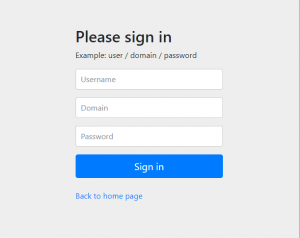
The login page we use collects our additional domain field that gets extracted by our SimpleAuthenticationFilter:
<form class="form-signin" th:action="@{/login}" method="post">
 <h2 class="form-signin-heading">Please sign in</h2>
 <p>Example: user / domain / password</p>
 <p th:if="${param.error}" class="error">Invalid user, password, or domain</p>
 <p>
   <label for="username" class="sr-only">Username</label>
   <input type="text" id="username" name="username" class="form-control"
     placeholder="Username" required autofocus/>
 </p>
 <p>
   <label for="domain" class="sr-only">Domain</label>
   <input type="text" id="domain" name="domain" class="form-control"
     placeholder="Domain" required autofocus/>
 </p>
 <p>
   <label for="password" class="sr-only">Password</label>
   <input type="password" id="password" name="password" class="form-control"
     placeholder="Password" required autofocus/>
 </p>
 <button class="btn btn-lg btn-primary btn-block" type="submit">Sign in</button><br/>
 <p><a href="/index" th:href="@{/index}">Back to home page</a></p>
</form>
When we run the application and access the context at http://localhost:8081, we see a link to access a secured page. Clicking the link will cause the login page to display. As expected, we see the additional domain field:
3.5. Summary
In our first example, we were able to reuse DaoAuthenticationProvider and UsernamePasswordAuthenticationToken by “faking out” the username field.
As a result, we were able to add support for an extra login field with a minimal amount of configuration and additional code.
4. Custom Project Setup
Our second approach will be very similar to the first but may be more appropriate for non-trivial uses cases.
The key components of our second approach will include:
- CustomAuthenticationFilter – an extension of UsernamePasswordAuthenticationFilter
- CustomUserDetailsService – a custom interface declaring a loadUserbyUsernameAndDomain method
- CustomUserDetailsServiceImpl – an implementation of our CustomUserDetailsService
- CustomUserDetailsAuthenticationProvider – an extension of AbstractUserDetailsAuthenticationProvider
- CustomAuthenticationToken – an extension of UsernamePasswordAuthenticationToken
- User – an extension of the User class provided by Spring Security that declares our extra domain field
- SecurityConfig – our Spring Security configuration that inserts our CustomAuthenticationFilter into the filter chain, declares security rules and wires up dependencies
- login.html – the login page that collects the username, password, and domain
4.1. Custom Authentication Filter
In our CustomAuthenticationFilter, we extract the username, password, and domain fields from the request. These values are used to create an instance of our CustomAuthenticationToken which is passed to the AuthenticationProvider for authentication:
public class CustomAuthenticationFilter
  extends UsernamePasswordAuthenticationFilter {

    public static final String SPRING_SECURITY_FORM_DOMAIN_KEY = "domain";

    @Override
    public Authentication attemptAuthentication(
        HttpServletRequest request,
        HttpServletResponse response)
          throws AuthenticationException {

        // ...

        CustomAuthenticationToken authRequest = getAuthRequest(request);
        setDetails(request, authRequest);
        return this.getAuthenticationManager().authenticate(authRequest);
    }

    private CustomAuthenticationToken getAuthRequest(HttpServletRequest request) {
        String username = obtainUsername(request);
        String password = obtainPassword(request);
        String domain = obtainDomain(request);

        // ...

        return new CustomAuthenticationToken(username, password, domain);
    }
4.2. Custom UserDetails Service
Our CustomUserDetailsService contract defines a single method called loadUserByUsernameAndDomain.
The CustomUserDetailsServiceImpl class we create simply implements the contract and delegates to our CustomUserRepository to get the User:
public UserDetails loadUserByUsernameAndDomain(String username, String domain)
     throws UsernameNotFoundException {
     if (StringUtils.isAnyBlank(username, domain)) {
         throw new UsernameNotFoundException("Username and domain must be provided");
     }
     User user = userRepository.findUser(username, domain);
     if (user == null) {
         throw new UsernameNotFoundException(
           String.format("Username not found for domain, username=%s, domain=%s",
             username, domain));
     }
     return user;
 }
4.3. Custom UserDetailsAuthenticationProvider
Our CustomUserDetailsAuthenticationProvider extends AbstractUserDetailsAuthenticationProvider and delegates to our CustomUserDetailService to retrieve the User. The most important feature of this class is the implementation of the retrieveUser method.
Note that we must cast the authentication token to our CustomAuthenticationToken for access to our custom field:
@Override
protected UserDetails retrieveUser(String username,
  UsernamePasswordAuthenticationToken authentication)
    throws AuthenticationException {

    CustomAuthenticationToken auth = (CustomAuthenticationToken) authentication;
    UserDetails loadedUser;

    try {
        loadedUser = this.userDetailsService
          .loadUserByUsernameAndDomain(auth.getPrincipal()
            .toString(), auth.getDomain());
    } catch (UsernameNotFoundException notFound) {

        if (authentication.getCredentials() != null) {
            String presentedPassword = authentication.getCredentials()
              .toString();
            passwordEncoder.matches(presentedPassword, userNotFoundEncodedPassword);
        }
        throw notFound;
    } catch (Exception repositoryProblem) {

        throw new InternalAuthenticationServiceException(
          repositoryProblem.getMessage(), repositoryProblem);
    }

    // ...

    return loadedUser;
}
4.4. Summary
Our second approach is nearly identical to the simple approach we presented first. By implementing our own AuthenticationProvider and CustomAuthenticationToken, we avoided needing to adapt our username field with custom parsing logic.
5. Conclusion
In this article, we’ve implemented a form login in Spring Security that made use of an extra login field. We did this in 2 different ways:
- In our simple approach, we minimized the amount of code we needed write. We were able to reuse DaoAuthenticationProvider and UsernamePasswordAuthentication by adapting the username with custom parsing logic
- In our more customized approach, we provided custom field support by extending AbstractUserDetailsAuthenticationProvider and providing our own CustomUserDetailsService with a CustomAuthenticationToken
As always, all source code can be found over on GitHub.
