Monitoring your application by using Spring Boot Actuator Endpoint is slightly difficult. Because, if you have ‘n’ number of applications, every application has separate actuator endpoints, thus making monitoring difficult. Spring Boot Admin Server is an application used to manage and monitor your Microservice application.
To handle such situations, CodeCentric Team provides a Spring Boot Admin UI to manage and monitor all your Spring Boot application Actuator endpoints at one place.
For building a Spring Boot Admin Server we need to add the below dependencies in your build configuration file.
Maven users can add the below dependencies in your pom.xml file −
<dependency>
   <groupId>de.codecentric</groupId>
   <artifactId>spring-boot-admin-server</artifactId>
   <version>1.5.5</version>
</dependency>
<dependency>
   <groupId>de.codecentric</groupId>
   <artifactId>spring-boot-admin-server-ui</artifactId>
   <version>1.5.5</version>
</dependency>
Gradle users can add the below dependencies in your build.gradle file −
compile group: 'de.codecentric', name: 'spring-boot-admin-server', version: '1.5.5'
compile group: 'de.codecentric', name: 'spring-boot-admin-server-ui', version: '1.5.5'
Add the @EnableAdminServer annotation in your main Spring Boot application class file. The @EnableAdminServer annotation is used to make your as Admin Server to monitor all other microservices.
package com.maixuanviet.adminserver;

import org.springframework.boot.SpringApplication;
import org.springframework.boot.autoconfigure.SpringBootApplication;
import de.codecentric.boot.admin.config.EnableAdminServer;

@SpringBootApplication
@EnableAdminServer
public class AdminserverApplication {
   public static void main(String[] args) {
      SpringApplication.run(AdminserverApplication.class, args);
   }
}
Now, define the server.port and application name in application.properties file a shown −
server.port = 9090
spring.application.name = adminserver
For YAML users, use the following properties to define the port number and application name in application.yml file.
server:
   port: 9090
spring:
   application:
      name: adminserver
The build configuration file is given below.
For Maven users – pom.xml
<?xml version = "1.0" encoding = "UTF-8"?>
<project xmlns = "http://maven.apache.org/POM/4.0.0"
   xmlns:xsi = "http://www.w3.org/2001/XMLSchema-instance"
   xsi:schemaLocation = "http://maven.apache.org/POM/4.0.0
   http://maven.apache.org/xsd/maven-4.0.0.xsd">

   <modelVersion>4.0.0</modelVersion>
   <groupId>com.maixuanviet</groupId>
   <artifactId>adminserver</artifactId>
   <version>0.0.1-SNAPSHOT</version>
   <packaging>jar</packaging>

   <name>adminserver</name>
   <description>Demo project for Spring Boot</description>

   <parent>
      <groupId>org.springframework.boot</groupId>
      <artifactId>spring-boot-starter-parent</artifactId>
      <version>1.5.9.RELEASE</version>
      <relativePath /> <!-- lookup parent from repository -->
   </parent>

   <properties>
      <project.build.sourceEncoding>UTF-8</project.build.sourceEncoding>
      <project.reporting.outputEncoding>UTF-8</project.reporting.outputEncoding>
      <java.version>1.8</java.version>
   </properties>

   <dependencies>
      <dependency>
         <groupId>org.springframework.boot</groupId>
         <artifactId>spring-boot-starter</artifactId>
      </dependency>

      <dependency>
         <groupId>de.codecentric</groupId>
         <artifactId>spring-boot-admin-server</artifactId>
         <version>1.5.5</version>
      </dependency>

      <dependency>
         <groupId>de.codecentric</groupId>
         <artifactId>spring-boot-admin-server-ui</artifactId>
         <version>1.5.5</version>
      </dependency>

      <dependency>
         <groupId>org.springframework.boot</groupId>
         <artifactId>spring-boot-starter-test</artifactId>
         <scope>test</scope>
      </dependency>
   </dependencies>

   <build>
      <plugins>
         <plugin>
            <groupId>org.springframework.boot</groupId>
            <artifactId>spring-boot-maven-plugin</artifactId>
         </plugin>
      </plugins>
   </build>

</project>
For Gradle users – build.gradle file
buildscript {
   ext {
      springBootVersion = '1.5.9.RELEASE'
   }
   repositories {
      mavenCentral()
   }
   dependencies {
      classpath("org.springframework.boot:spring-boot-gradle-plugin:${springBootVersion}")
   }
}

apply plugin: 'java'
apply plugin: 'eclipse'
apply plugin: 'org.springframework.boot'

group = 'com.maixuanviet'
version = '0.0.1-SNAPSHOT'
sourceCompatibility = 1.8
repositories {
   mavenCentral()
}
dependencies {
   compile('org.springframework.boot:spring-boot-starter')
   compile group: 'de.codecentric', name: 'spring-boot-admin-server', version: '1.5.5'
   compile group: 'de.codecentric', name: 'spring-boot-admin-server-ui', version: '1.5.5'
   testCompile('org.springframework.boot:spring-boot-starter-test')
}
You can create an executable JAR file, and run the Spring Boot application by using the following Maven or Gradle commands −
For Maven, use the command shown here −
mvn clean install
After “BUILD SUCCESS”, you can find the JAR file under target directory.
For Gradle, use the command shown here −
gradle clean build
After “BUILD SUCCESSFUL”, you can find the JAR file under build/libs directory.
Now, run the JAR file by using the command given below −
java –jar <JARFILE>
Now, the application has started on the Tomcat port 9090 as shown here −

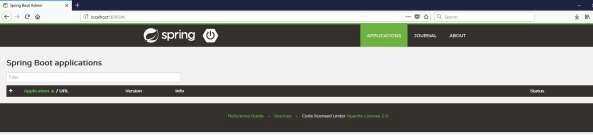
Now hit the below URL from your web browser and see the Admin Server UI.