
Table of Contents
Trong bài này, tôi sẽ giới thiệu với các bạn các đặc điểm của HashMap và các ví dụ cơ bản về sử dụng HashMap trong java. Trong bài viết tiếp theo, chúng ta sẽ tìm hiểu kỹ hơn về cách thức hoạt động bên trong của HashMap trong Java.
1. Đặc điểm
Những điểm quan trọng về lớp HashMap trong java cần nhớ là:
- HashMap lưu trữ dữ liệu dưới dạng cặp key và value.
- HashMap chỉ chứa các key duy nhất.
- HashMap có thể có 1 key là null và nhiều giá trị null.
- HashMap duy trì các phần tử KHÔNG theo thứ tự chèn.
2. Hierarchy của lớp HashMap
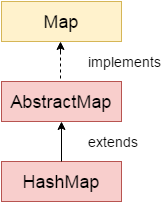
Lớp java.util.HashMap được định nghĩa như sau:
public class HashMap<K,V> extends AbstractMap<K,V>
        implements Map<K,V>, Cloneable, Serializable {

}
Trong đó:
- K: đây là kiểu key để lưu trữ.
- V: đây là kiểu giá trị được ánh xạ.
3. Các phương thức khởi tạo (constructor) của lớp HashMap
- HashMap(): khởi tạo một map trống.
- HashMap(Map<? extends K, ? extends V> m): khởi tạo một map với các phần tử của map m.
4. Các phương thức (method) của lớp HashMap
Xem thêm các phương thức của Map ở bài viết Map Interface trong java.
5. Ví dụ minh họa
5.1. Ví dụ sử dụng HashMap với kiểu dữ liệu cơ bản (Wrapper)
package com.maixuanviet.collection.map;

import java.util.HashMap;
import java.util.Map;
import java.util.Map.Entry;

public class HashMapExample {
    public static void main(String args[]) {
        // init map
        Map<Integer, String> map = new HashMap<Integer, String>();
        map.put(1, "Basic java");
        map.put(2, "OOP");
        map.put(3, "Collection");

        // show map using method keySet()
        for (Integer key : map.keySet()) {
            String value = map.get(key);
            System.out.println(key + " = " + value);
        }

        System.out.println("---");

        // show map using method keySet()
        for (Entry<Integer, String> entry : map.entrySet()) {
            Integer key = entry.getKey();
            String value = entry.getValue();
            System.out.println(key + " = " + value);
        }
    }
}
Kết quả thực thi chương trình trên:
1 = Basic java
2 = OOP
3 = Collection
---
1 = Basic java
2 = OOP
3 = Collection
5.2. Ví dụ sử dụng HashMap với key có kiểu String, value có kiểu Student
package com.maixuanviet.collection.map;

public class Student {
    private int id;
    private String name;

    public Student(int id, String name) {
        this.id = id;
        this.name = name;
    }

    @Override
    public String toString() {
        return "Student [id=" + id + ", name=" + name + "]";
    }

    public int getId() {
        return id;
    }

    public String getName() {
        return name;
    }

}
package com.maixuanviet.collection.map;

import java.util.HashMap;
import java.util.Map;
import java.util.Map.Entry;

public class HashMapExample2 {
    public static void main(String args[]) {
        // Student's data
        Student student1 = new Student(1, "Student 1");
        Student student2 = new Student(2, "Student 2");
        Student student3 = new Student(3, "Student 3");

        // init map
        Map<Integer, Student> map = new HashMap<Integer, Student>();
        map.put(student1.getId(), student1);
        map.put(student2.getId(), student2);
        map.put(student3.getId(), student3);

        // show map using method keySet()
        for (Integer key : map.keySet()) {
            Student value = map.get(key);
            System.out.println(key + " = " + value);
        }

        System.out.println("---");

        // show map using method keySet()
        for (Entry<Integer, Student> entry : map.entrySet()) {
            Integer key = entry.getKey();
            Student value = entry.getValue();
            System.out.println(key + " = " + value);
        }
    }
}
Kết quả thực thi chương trình trên:
1 = Student [id=1, name=Student 1]
2 = Student [id=2, name=Student 2]
3 = Student [id=3, name=Student 3]
---
1 = Student [id=1, name=Student 1]
2 = Student [id=2, name=Student 2]
3 = Student [id=3, name=Student 3]
Related posts:
Java Program to Generate Random Partition out of a Given Set of Numbers or Characters
Custom Cascading in Spring Data MongoDB
How to Replace Many if Statements in Java
Introduction to the Java ArrayDeque
Spring Data – CrudRepository save() Method
Overflow and Underflow in Java
Injecting Prototype Beans into a Singleton Instance in Spring
Từ khóa this và super trong Java
Jackson Ignore Properties on Marshalling
A Guide to Apache Commons Collections CollectionUtils
Quick Guide to java.lang.System
Java Program to Implement Ternary Heap
Chuyển đổi từ HashMap sang ArrayList
A Guide to LinkedHashMap in Java
Remove the First Element from a List
Tránh lỗi NullPointerException trong Java như thế nào?
Sử dụng CyclicBarrier trong Java
Sort a HashMap in Java
JUnit5 @RunWith
Java Program to Perform Quick Sort on Large Number of Elements
Java Program to Represent Graph Using Adjacency Matrix
Java Map With Case-Insensitive Keys
Java Program to Represent Graph Using Adjacency List
Giới thiệu Java Service Provider Interface (SPI) – Tạo các ứng dụng Java dễ mở rộng
Checked and Unchecked Exceptions in Java
Testing in Spring Boot
Java Program to Implement Bloom Filter
Java Program to Emulate N Dice Roller
Quick Guide on Loading Initial Data with Spring Boot
Java Program to Create a Random Linear Extension for a DAG
Deque và ArrayDeque trong Java
Netflix Archaius with Various Database Configurations
